

In Fading Echo, the world is alive with systemic elemental reactions: water trails absorbed by the sand, pools of lava cooled by water, and waste puddles that explode and spread out.
I designed and implemented a Grid System entirely in C++ within Unreal Engine: an optimized system composed of chunks and pooled cells that manages all elemental reactions. It is entirely data-driven, allowing designers to create unique systemic reactions in the game.
This post is a walkthrough of how that system works.
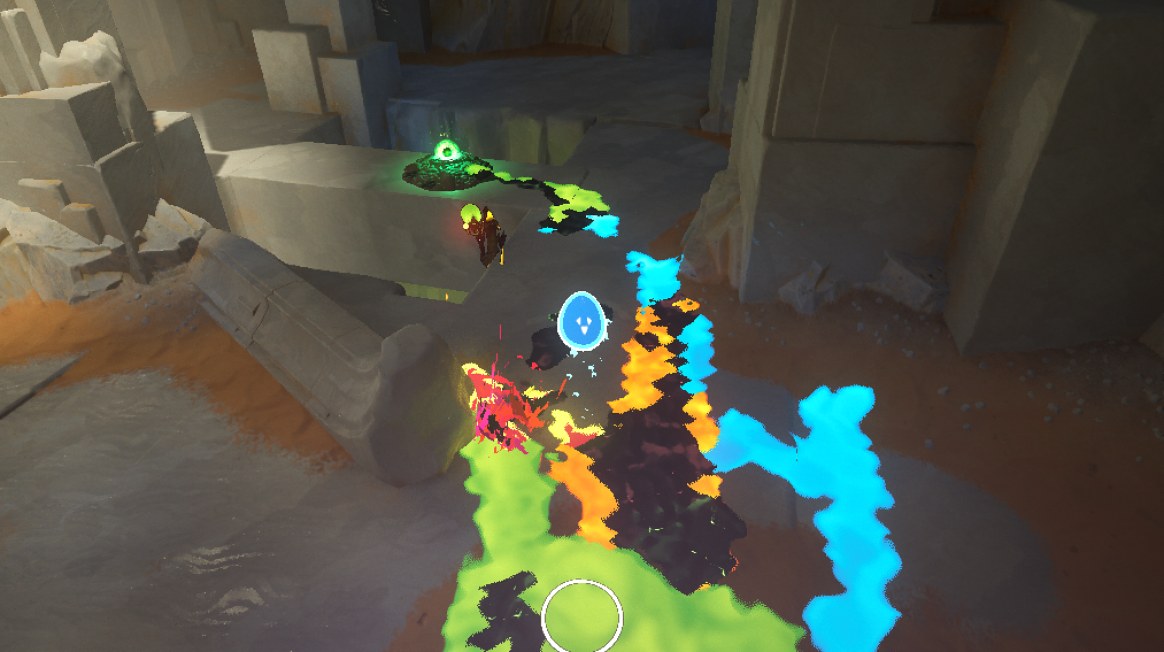
Data structure and Baking
In Fading Echo, elements are not just a visual effect painted on the ground. They need to react with each other, and entities need to interact with them. So they have to exist on the gameplay side, not only on the rendering side.
To make that possible, I put a grid on top of the environment. Each cell knows which elements are on it. It can be a fluid added at runtime by an entity (water, lava, toxic waste…), or the type of ground described in the map (sand, rock…).
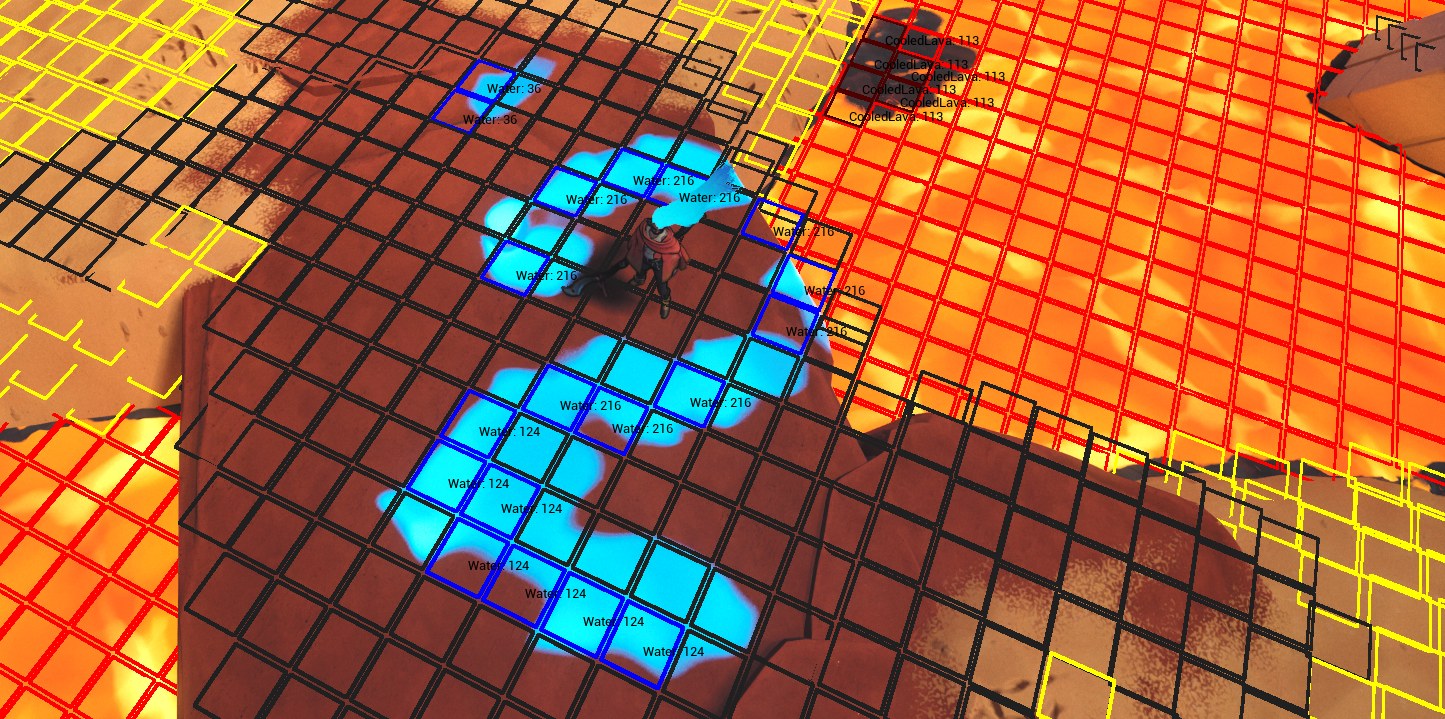
The world is not flat, but a 2D grid is. So each position of the grid doesn’t hold one cell, it holds a small list of cells, one per height. Under a bridge, for example, the same position holds a cell on the bridge, one on the water and one on the riverbed. When I need the cell under an entity, I take the one inside a small height range around it.
I kept the cell as small as possible: its coordinate, up to 4 elements with a one-byte quantity each, and two bit masks telling which reactions are currently running on it, 64 bits for the internal ones and 256 bits for the external ones. The elements are stored inline in a fixed-size array, so a cell never allocates memory on its own.
Baking
Building the grid while the game runs would be way too slow, so it’s baked in the editor, once per level. For each position of the grid, the baker casts a ray from the sky down to the ground. Every surface the ray hits becomes a cell at that height. If a hit is too close in height to the previous one, it is skipped. Otherwise, a few stacked meshes could generate dozens of cells at the same position for a single walkable surface.
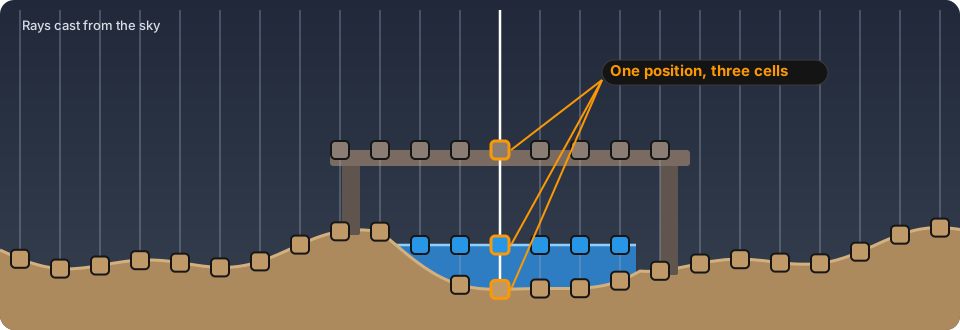
The starting element of a cell comes from the physical material of the surface it was built on: a sand material gives a sand cell, a rock material gives a rock cell. This mapping lives in a data asset, so designers set it up themselves.
The result is saved in a data asset as two flat arrays, positions and cells. It’s a compact, contiguous memory layout that is serialized in bulk, which makes it fast to load. When a level loads, the baked data is converted into the runtime grid over several frames with a small time budget, instead of doing all the work in a single frame.
Chunks and Culling
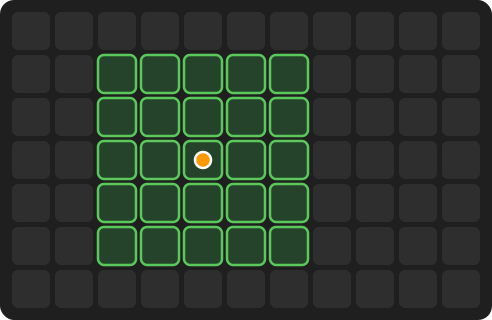
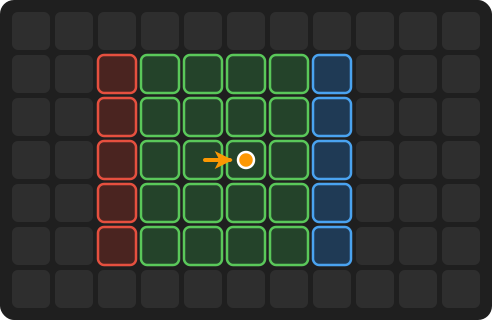
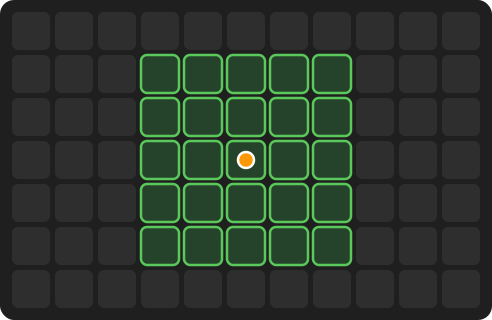
A level contains a lot of cells, and most of them are far away from the player. So the grid is split in chunks, and only the chunks around the player are active: a 5×5 square centered on the chunk the player is standing in. All the other chunks are asleep. The culling is only recomputed when the player enters a new chunk: as long as they stay in the same one, the update stops right away.
The cells are pooled. Instead of allocating memory every time a chunk wakes up, the system keeps a pool of grid portions: blocks of memory preallocated at the exact size of a chunk. Each portion allocates its arrays once, and the cells of a position are stored contiguously in memory. When a chunk becomes active, it borrows a free portion and its baked cells are copied into that existing memory, without shrinking or reallocating the arrays. When it goes back to sleep, its reactions are flushed and the portion goes back to the pool. The goal was to stay cache-friendly: the baked data is two flat arrays and a cell stores its elements inline, so reading them doesn’t jump between scattered allocations.
Activating and flushing chunks also work with a time budget. When the player crosses a chunk border, the new chunks are filled over a few frames instead of all at once. And if the player turns back before a chunk was flushed, it is simply reactivated as it is.
Portals
In Fading Echo, a portal shows a piece of another dimension, which is another level, right inside the current one. The grid has to follow what the player sees. When a portal opens, the cells of the active chunks inside the portal’s sphere are swapped with the baked cells of the other level. To find them, the system builds a lookup table of the other level’s baked positions, instead of allocating a full 2D grid for it. Inside the portal, the ground and its elements come from the other dimension.
Elemental Reactions
Depending on the elements present in the same cell, reactions can be triggered. A reaction is a basic condition-effect pair: it checks the state of a cell and applies a bunch of effects to it. Here are some examples of reactions we have in the game:
- Water on sand is absorbed until it disappears.
- Water on lava creates cooled lava.
- Cooled lava on lava is absorbed over time until it disappears.
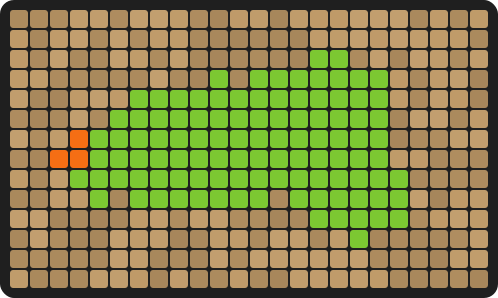
- Lava on toxic waste spreads across the waste puddles, removing the waste.
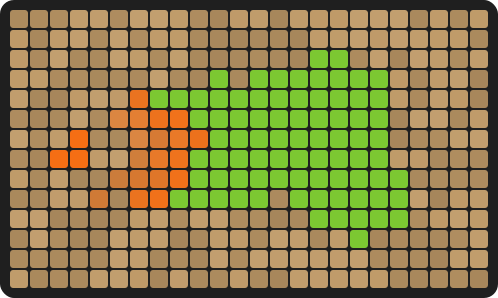
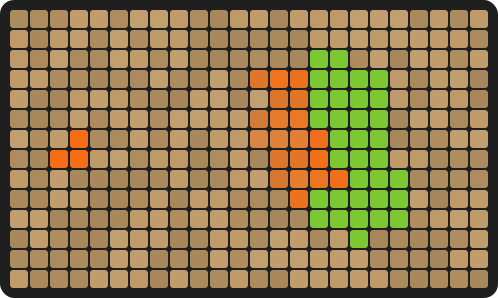
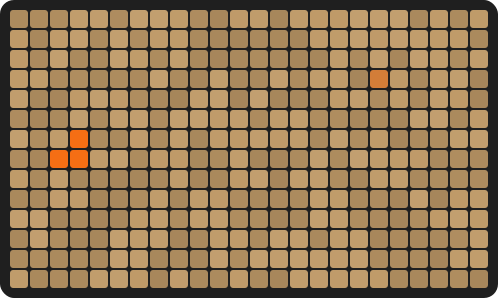
Below, the last one is simulated with the same rule as the propagate effect. Each burning cell sets its neighbors on fire after its own random delay, so the fire doesn’t move like a perfect wave and looks more natural.
A reaction has a small life cycle on each cell it touches:
Conditions can check which elements are in the cell, their quantity, how long the reaction has been running or whether its effects are finished, and they can be combined with And and Or. Effects can add or remove an element, change a quantity over time, spread or propagate to the neighbor cells, spawn a VFX or play a sound.
- And
- Or
- Elements
- Quantity
- Duration
- Effect Finished
- Elemental Add
- Elemental Remove
- Elemental Quantity
- Elemental Propagate
- Spread
- VFX
- Sound
A cell runs only one reaction at a time. Each reaction has a priority, and a reaction with a higher priority can take over one that is already running on a cell. When an internal reaction can’t take a cell yet, it keeps it in a pending list and tries again on the next updates.
Internal and external reactions
There are two kinds of reactions in the Grid System.
Internal reactions belong to the world. They aren’t linked to anything: they watch the cells and start as soon as a cell matches their conditions. All the examples above are internal reactions, and they are all referenced in a single data asset.
- Water absorbed by sand
- Cooled lava absorbed by lava
- Cooled lava created by water on lava
- Water absorbed by rock
External reactions are linked to an entity, and their effects can also be applied to the entity itself. Here are some examples:
- The player in their water form leaves water on the ground.
- The player in their human form leeches the water on the ground, increasing their mana gauge.
- Elemental enemies leave a puddle of their associated element on the ground when dying.
- Entities start burning when walking on lava.
An entity registers to the Grid System with a Grid Monitor component, which references the external reactions of that entity.
- Entity Component
- Grid Monitor
External Reactions SetWater Wave Reactions
Instead of watching the whole world, an external reaction only looks at the cells inside a shape attached to the entity: a box (AABB or OBB) or a circle. This lets us adapt the reaction to each entity. For instance, to avoid being too punishing, the player needs a majority of lava cells below them to start burning, while other entities burn as soon as they have one lava cell below them.
External reactions also come with a few extra settings: a gameplay condition that has to be true before the reaction even looks at the cells, game effects applied to the entity, once for the whole reaction or for each cell, and an infinite option. With it, cells stay in the reaction as long as they are inside the shape. That’s how the water form keeps a circle of water around it while it stands still.
External reactions usually have a higher priority than internal ones, so what an entity does wins over what the world is doing.
The data to rule them all
Nothing here is hard-coded. Grid settings, elements, reaction conditions and effects… everything is described in data assets. Designers can experiment, create and tweak reactions directly in the editor without any new code.
Debug views
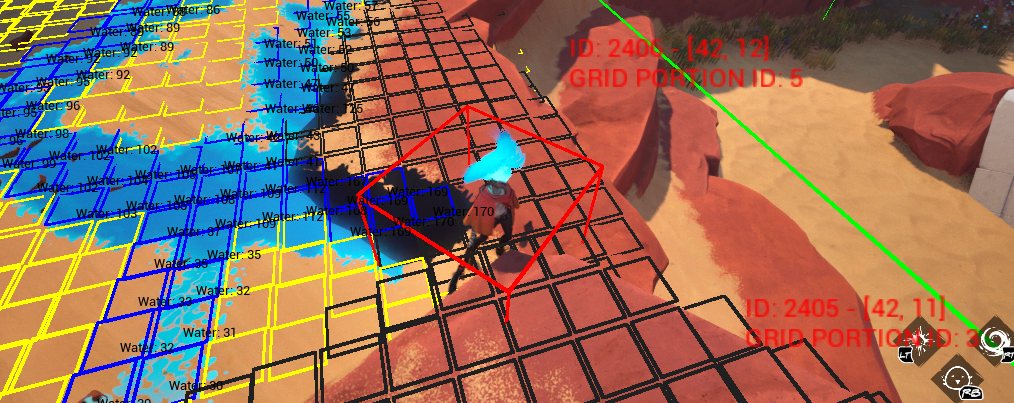
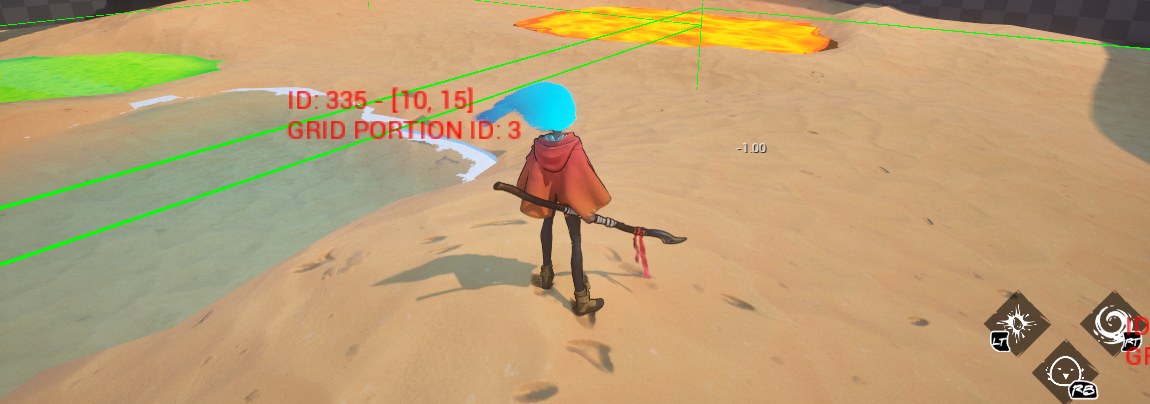
To check all of this in game, the Grid System comes with a few debug commands that draw its data in the world:
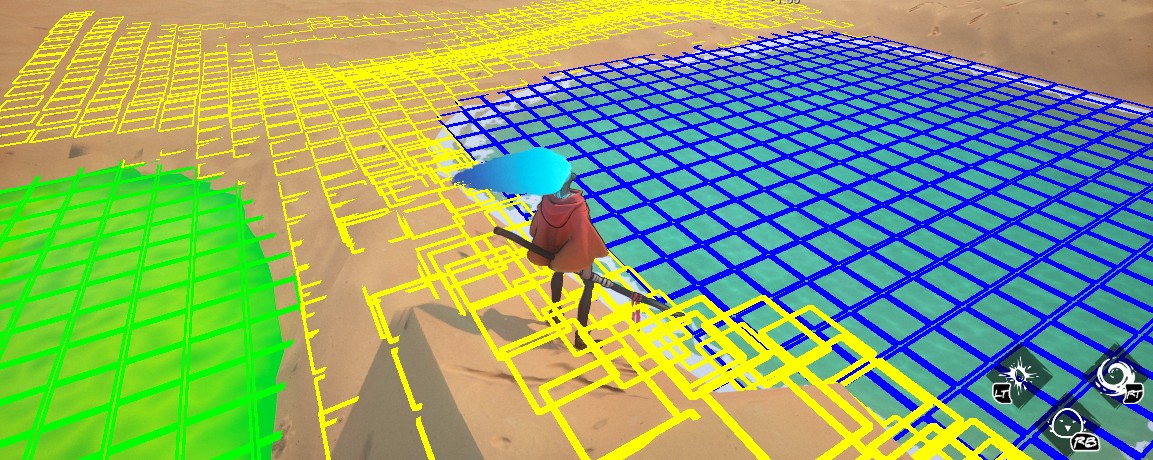
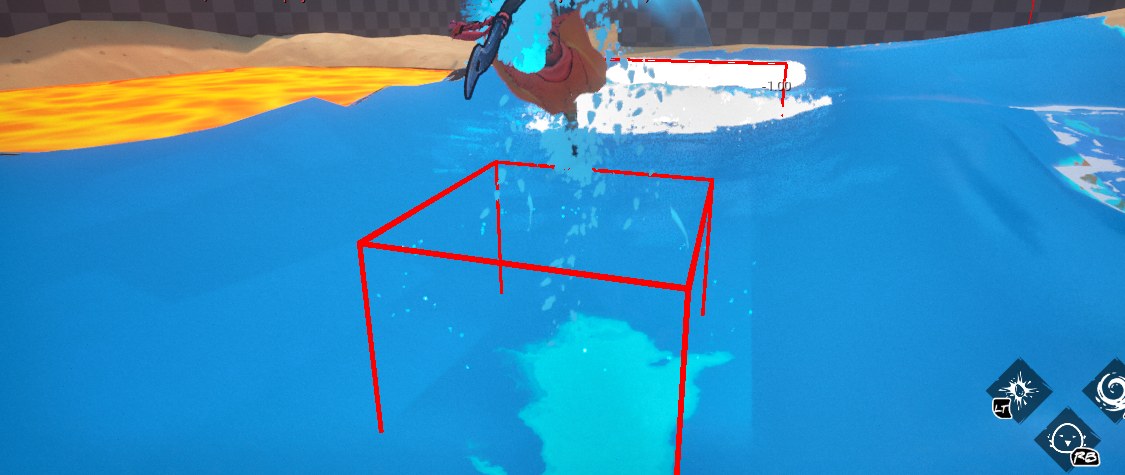
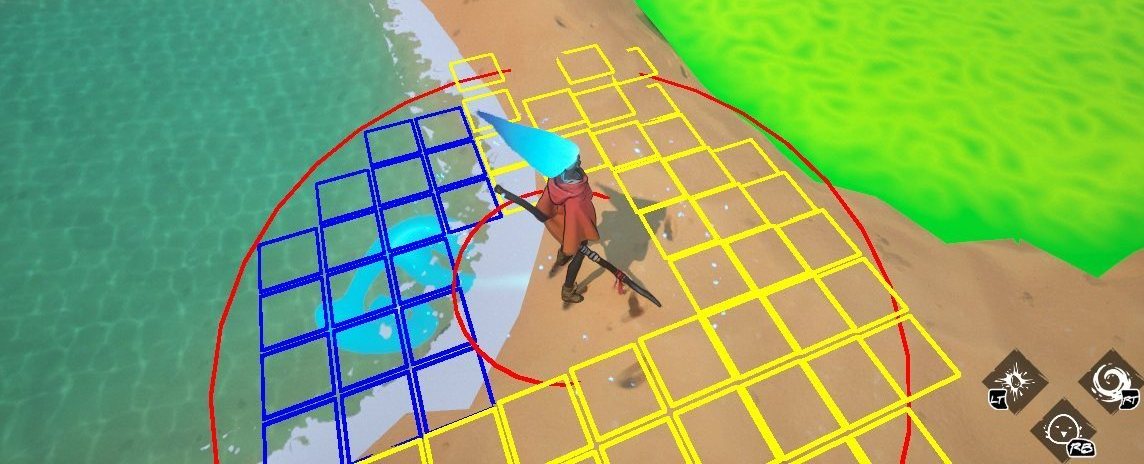
The Runtime: Registering and Updating
Every frame, the Grid System does the same things in the same order: it updates the culling around the player, updates the external reactions, then the internal reactions, and finally sends the active cells to the renderer.
The simple version would be to test every reaction on every cell, every frame. That doesn’t scale, so the two kinds of reactions find their cells differently:
- Internal reactions only look at the cells that just changed. When an element is added or removed, or when a quantity changes, the cell is put in a “recently updated” list. On the next frame, these reactions only test the cells of that list. On the simulation side, a cell that nothing touches costs nothing.
- External reactions only test the cells inside the shape of their entity.
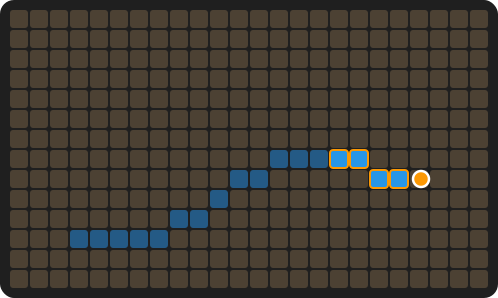
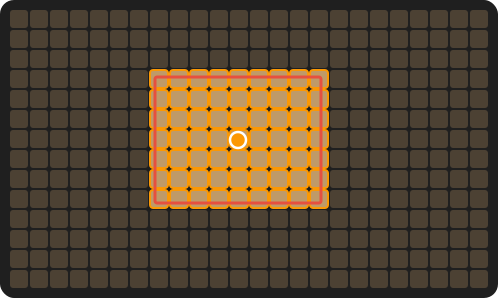
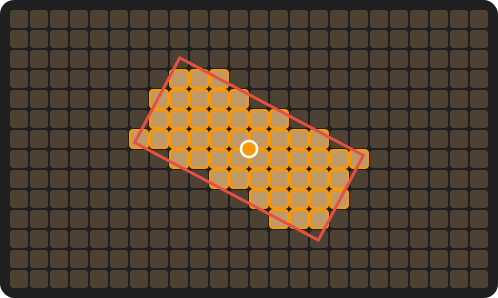
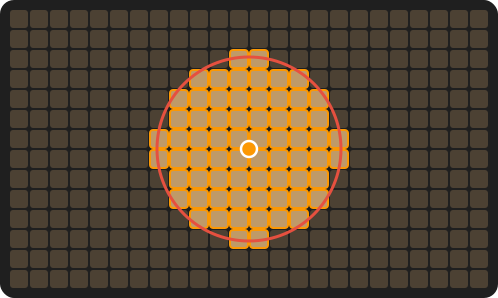
In orange, the cells tested this frame.
When a cell matches the start conditions, the reaction creates a small state for it: the time since it started, the current values of its continuous effects, and so on. These states live in a contiguous array, and a free list reuses the slots of the reactions that ended, so starting and stopping reactions on cells doesn’t allocate memory. And since each cell keeps a bit mask of the reactions running on it, knowing if a reaction is already running on a cell is a single bit check.
Then each running reaction updates its continuous effects and checks its end conditions. When they are true, the closing effects are applied and the state goes back to the pool.
The grid is shared between the game thread and the render thread. If the render thread is still reading it, the game thread doesn’t wait. It skips the Grid System update for this frame and adds the time to the next one.
| Simulation (game thread) | Idle | Stress test |
|---|---|---|
| Reactions and culling | 0.03 – 0.05 ms | 0.08 – 0.4 ms |
| Spatial queries (box, circle, OBB) | 1 – 6 µs per query | 1 – 6 µs per query |
Measured in our worst-case scenario: a level with a lot of verticality, so a lot of cells stacked on the height. Idle is the player standing still, the stress test is an intense fight with fluids spreading everywhere.
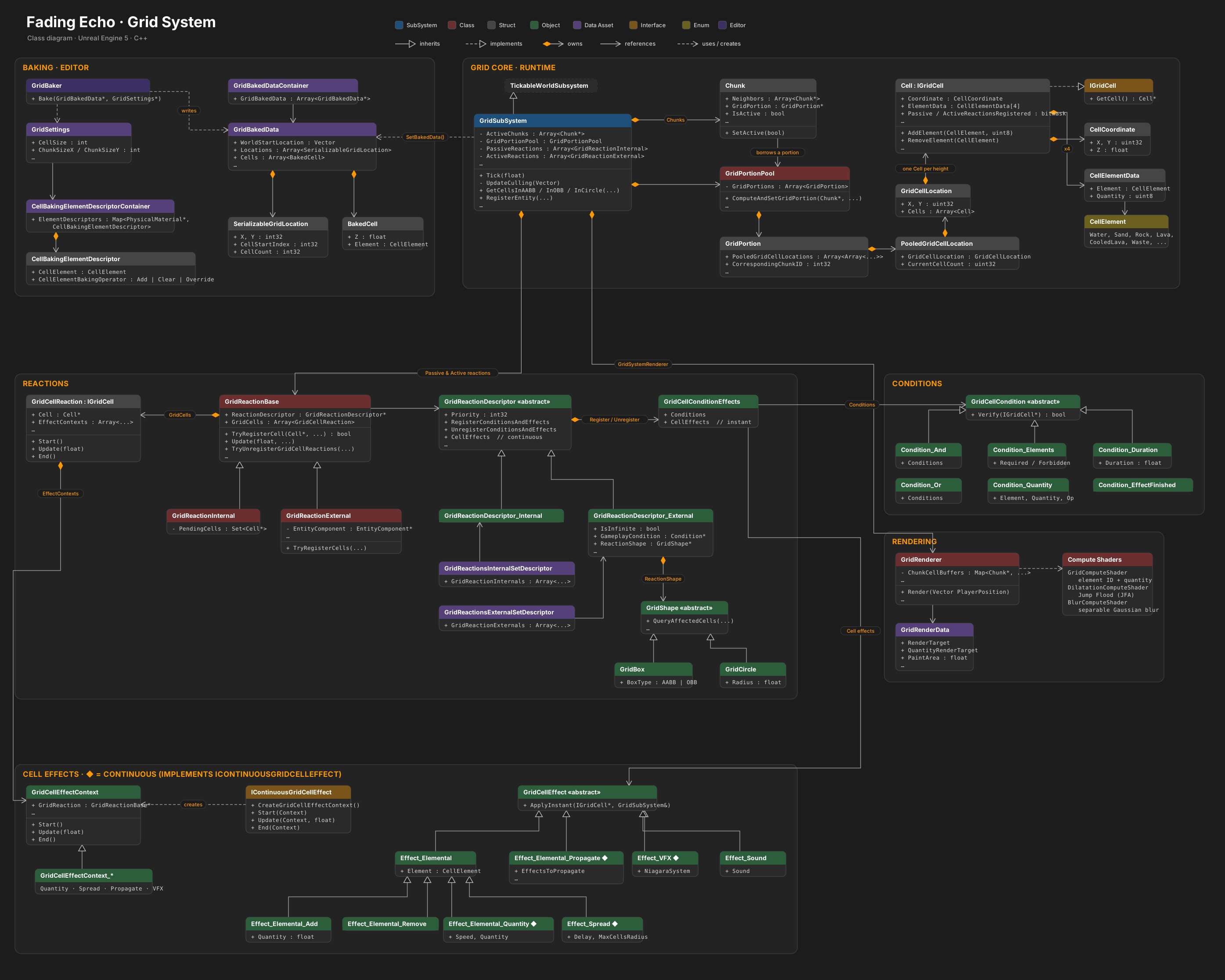
Rendering with Compute Shaders
Elements added by entities or created by reactions are written in render targets. They only cover the area around the player, so only a limited part of the grid is rendered at once. The shaders of the environment then read them to draw the elements on the ground.
The render targets follow the player, but their position is snapped to the size of a texel. This way, the texels stay aligned with the same spots of the world, and the edges of the puddles don’t shimmer when the player moves.
The render targets are filled on the GPU with compute shaders, in a few passes:
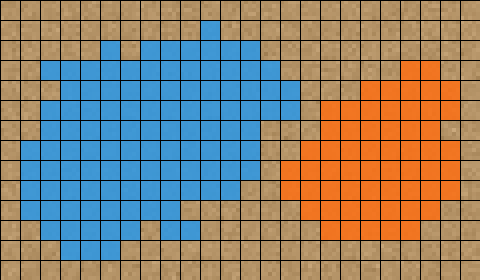
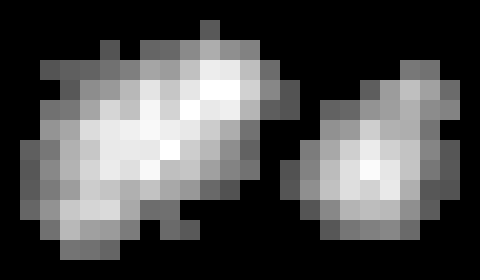
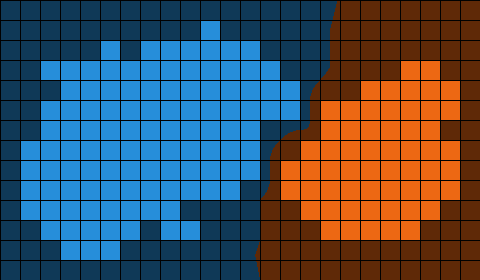
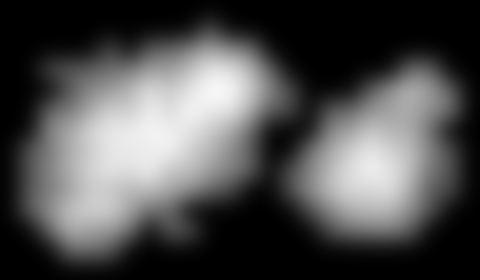
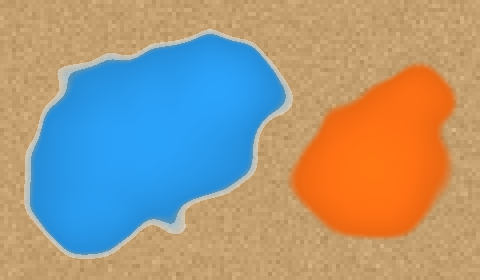
The grid is written in two render targets in RGBA16f: four channels of 16-bit floats, so 64 bits per texel. Here is what each channel holds:
So a single texel can hold two fluids at once, with their quantities and the height they are at.
The cells are uploaded to a GPU buffer that is only recreated when it gets too small, the rest of the time it is reused. Preparing this data on the render thread is currently the most expensive step of the system. Flagging the chunks as dirty, to only rebuild the ones whose cells changed, would cut down this hand-off between the CPU and the GPU.
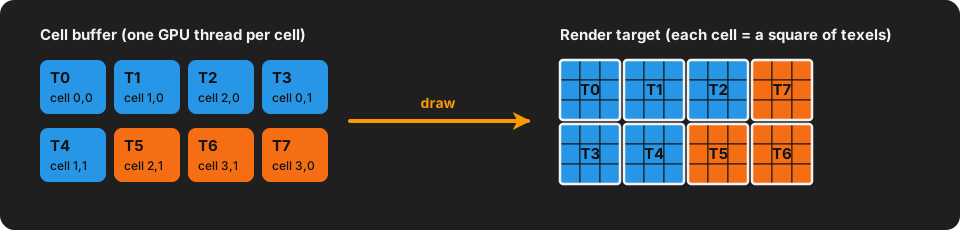
The first pass runs one GPU thread per cell, and each thread draws its cell as a small square of texels. Seen like this, the puddles are just squares.
To avoid seeing the squarish aspect of the grid in the world, the quantity is blurred with a Gaussian blur, done in two passes, horizontal then vertical.
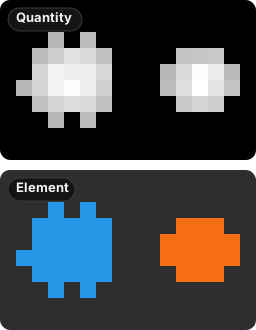
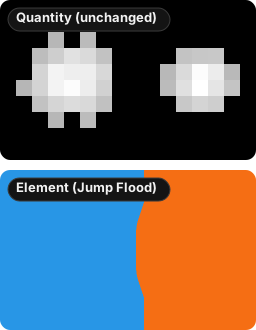
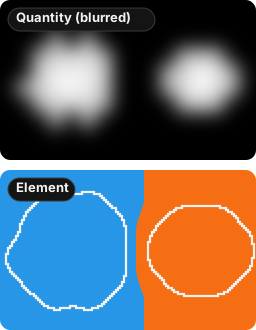
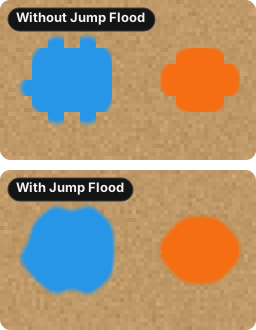
But the blurred quantity spreads a little outside of the original cells, onto texels that have no element in the Element texture. These soft edges would have some fluid but no color, and the puddles would stay square, as the top of step 4 shows.
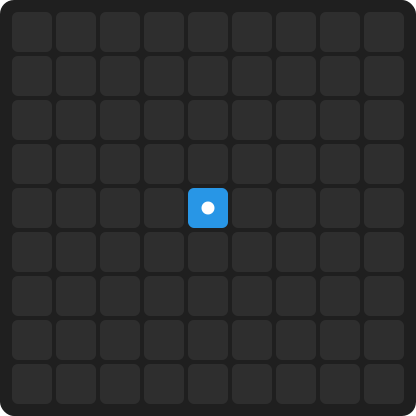
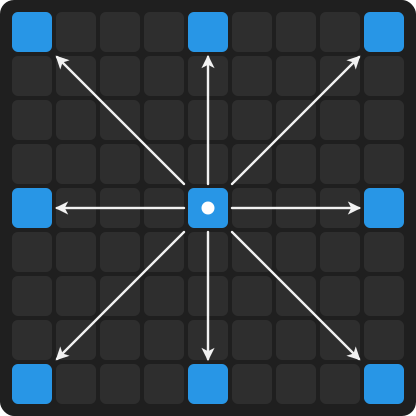
That’s why the Jump Flood pass runs on the Element texture before the blur: it gives every texel the element of its closest cell, as in step 2. Once the quantity is blurred in step 3, every texel inside the white outline already has an element. To find that closest cell quickly, it works in a few passes. In each pass, every texel looks at 8 neighbors at a given distance and keeps the closest cell they lead to. Then the distance is halved for the next pass: far away first, then closer and closer.
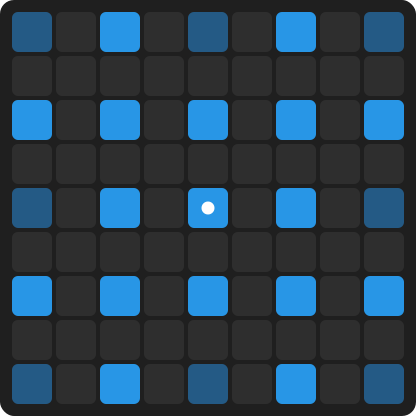
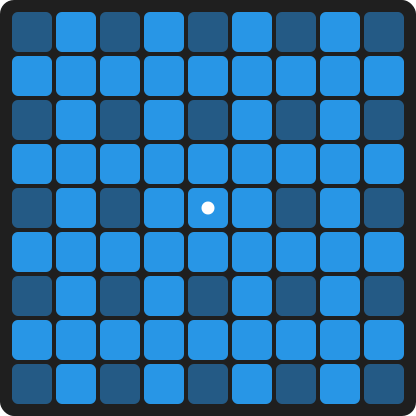
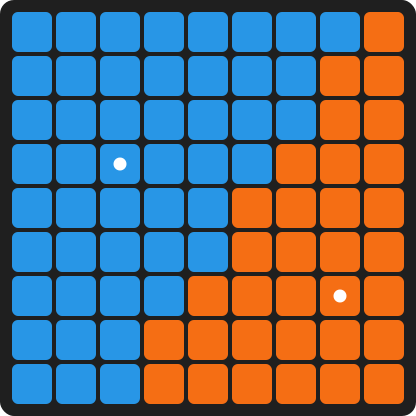
In the end, the two textures work together: the Quantity texture gives the shape of the puddle, and the Element texture tells which fluid it is, as in step 4. Both fluids are handled in the same passes, and the height of the closest cell is copied along with its element.
| GPU passes | Idle | Stress test |
|---|---|---|
| Jump Flood | 0.12 – 0.13 ms | 0.12 – 0.13 ms |
| Blur (2 passes) | ~0.05 ms | ~0.05 ms |
| Cell rasterization | < 0.01 ms | < 0.01 ms |
| Total | 0.22 – 0.23 ms | 0.23 – 0.24 ms |
Same scenario as above. At 60 fps, the whole GPU pipeline takes about 1% of the frame, whatever happens on screen.
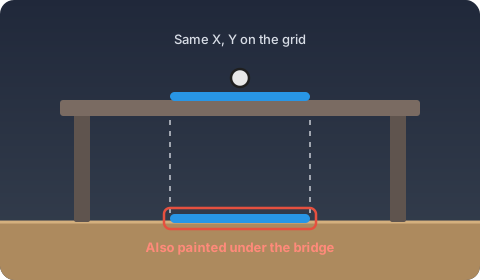
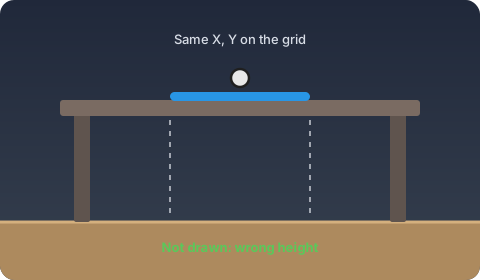
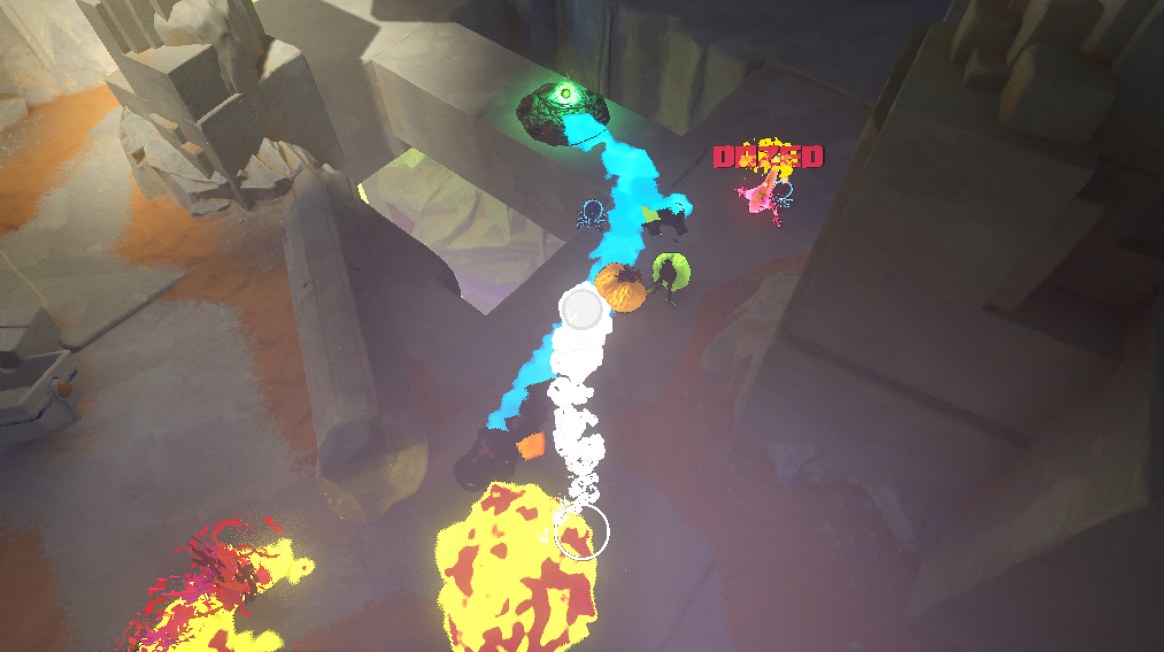
A render target is a 2D texture, and that gave us one big issue: a puddle on a bridge was also painted on the ground under the bridge, since both share the same X, Y. To fix it, each texel also stores the height of the cell it comes from. When two cells land on the same texel, the one closest to the player’s height wins.
Creating a New Fluid
Adding a new reaction is only data. A new fluid just needs to be declared as a new element, with its color, and the ground shaders need to know how to draw it.
From there, the fluid is part of the system like any other element: it can be used in the baking, in conditions, in effects, and designers can start building new reactions around it.
The Grid System shipped with Fading Echo on PC, Xbox Series X|S, PS5 and Switch 2. If you want to see it in action, go grab the game and start pouring water on some lava!
This system was a team effort. Thanks to Rémi Ducher, my tech lead, to my colleague Valentin Comte, and to Thibaud Juge, the technical artist with whom I spent many hours figuring out the rendering challenges.